Hi folks - I’m writing today to announce the release of a critical new feature to the OpenFn platform: Sandboxes 
Sandboxes have actually been available in the product for some time, as a beta-grade feature, hidden under the Enable Experimental Features flag.
After extensive testing, since Lightning 2.16.5 (released yesterday!) sandboxes are available to all users 
What is a sandbox?
A sandbox is almost literally a copy of your project saved in the app.
You can edit the sandbox, run workflows, and even assign different credentials - all without touching your original project.
It’s a bit like if you exported your project and re-imported it again. Except that we treat a few things specially for sandboxes - like billing and credentials,
How does it help me?
Sandboxes allow you to develop your workflows in total isolation, like a staging environment.
This is super important after you’re launched your workflow live. You don’t want to make changes to your main production workflow while it’s processing real-world data. So how do you safely make and test changes before deploying live?
Well, now you can clone your project into a sandbox and get straight to work without affecting production runs. Your sandbox has its own private set of webhooks and its own cron settings. And you can plug in alternate credentials to access developer accounts for your connected systems.
How do I use it?
With sandboxes, we expect your workflow’s development cycle to be like this:
- You need to fix a bug on a production workflow
- Create a new sandbox
- Edit your workflows, make your changes, and test
- Merge the sandbox back into your production project
Doing all this could hardly be easier. From inside your project, just click the Sandbox tab on the left.
From here you can see your sandboxes, create new ones, merge them back into the OG project
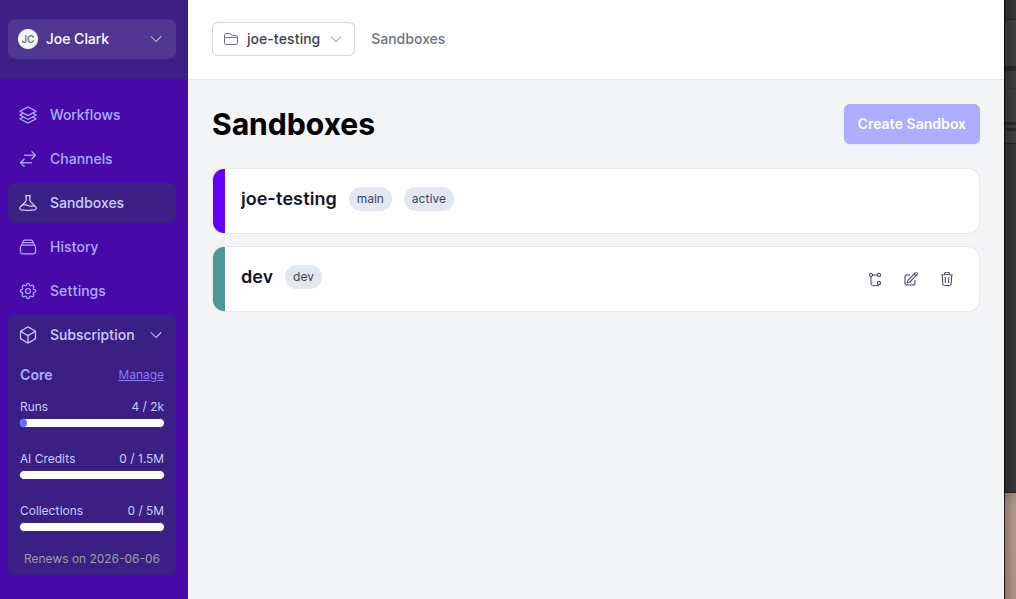
And sandboxes are fully compatible with the CLI. They work just like any other project - you can pull them, edit them, execute them, and deploy them back to the app.
Managing Credentials
Credentials is the tricky bit - and the most important. Your sandbox probably doesn’t want to be calling out to your production systems and databases to fetch and upload data. But you also don’t want to create whole new credentials because they won’t sync properly when you merge your sandbox.
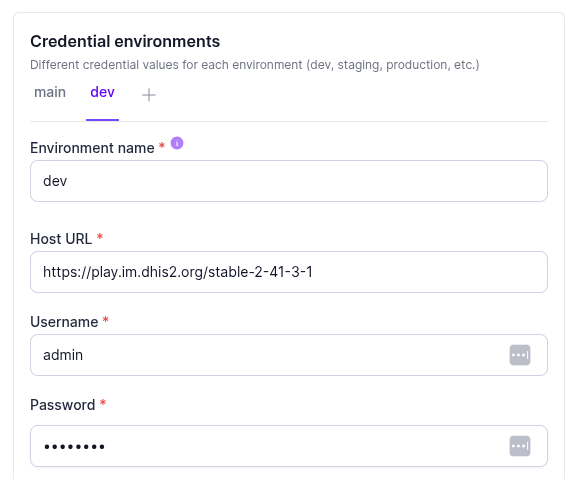
We resolve this by introducing the idea of an environment to your credential. Now your credentials are split into environments - which are just arbitrary labels to describe a set of credentials. By default you have a main credential which accesses your production system. But you can also create a dev variation (calling it whatever you like) which provides access to your other dev/testing/sandbox systems.
Each sandbox has a single environment associated with it. By default your original project is uses main, and all sandboxes use dev. When running workflows, we’ll load the right variation for your environment.
What else do I need to know?
At the moment, we’ve designed sandboxes to be short-lived. This ensures that your sandboxes don’t fall too far out of date with your production project. If you’ve used git (or other source control tools) you’ll know how difficult merge conflicts can be to resolve. Sandboxes aren’t git - but can be susceptible to similar issue as projects drift apart.
When you create a sandbox, we copy user access from the original project you forked from. But after that, access control is totally independent. You can add or remove users to your sandbox and the OG project is unaffected.
Billing is shared between the project and all your sandboxes. Runs and AI credits in a sandbox count towards the parent project’s allowance.
Where do I read more?
Check out the full guide at Sandboxes | OpenFn/docs
That’s all from me - this is just a quick intro. We’ll be watching and improving sandboxes in the future - and we’re excited to see can they can improve your automation experience.