I have managed to self host a lighting instance. Creating a specific workflow, I’m landing into this issue. I have shared the screenshot of the video. The instance is running on top of docker. @midigofrank @joe

Hey @SimonKihara, thanks for reaching out.
It’s not immediately clear what the problem is. Do you have a full video you can post? Do you have any console or app logs? What steps did you take to get here?
Hi @joe . Thanks for the quick response. Please find the attached video and the logs screen shots
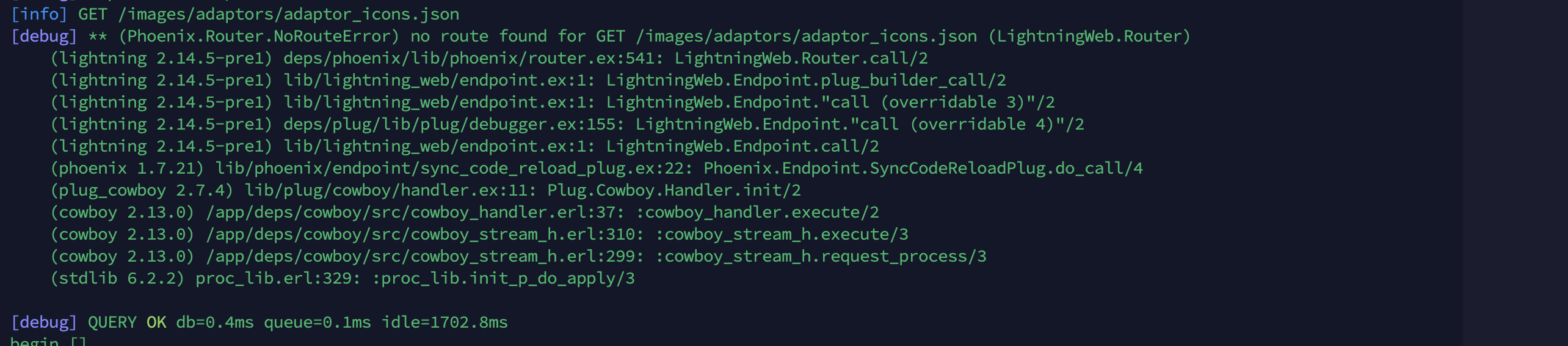
Video link: https://drive.google.com/file/d/1zM903ujZQ2aWaaZkUh7yXF0QRpHHJWjp/view?usp=sharing
cc: @midigofrank

That’s crazy - something is very unhappy in Javascriptland.
What node.js version are you running in Docker?
I note you’re a few versions behind production lighting - might be worth updating to latest, just in case you’ve pulled a bad commit or build or something.
@midigofrank I can see that adaptor icons are failing to load. What might be causing that? Does Simon need to run a particular command to build the icons? The errors do seem to correspond to adaptors. Maybe we’ve introduced an issue where, if adaptor icons fail to load, the JS app explodes 
Hmm, @SimonKihara from the screenshot it looks like you built the lightning image yourself. Which Dockerfile did you use? There is Dockerfile and Dockerfile-dev in the project root
x-lightning: &default-app
  build:
    dockerfile: Dockerfile-dev
    context: '.'
    args:
      - 'MIX_ENV=${MIX_ENV:-dev}'
      - 'NODE_ENV=${NODE_ENV:-development}'
I see. I’ll investigate. There is a probability that the icons are not downloaded during build.
I would advise that you use pre-built images instead. Here’s a docker-compose file: Vanilla docker compose configuration?