Dear Community,
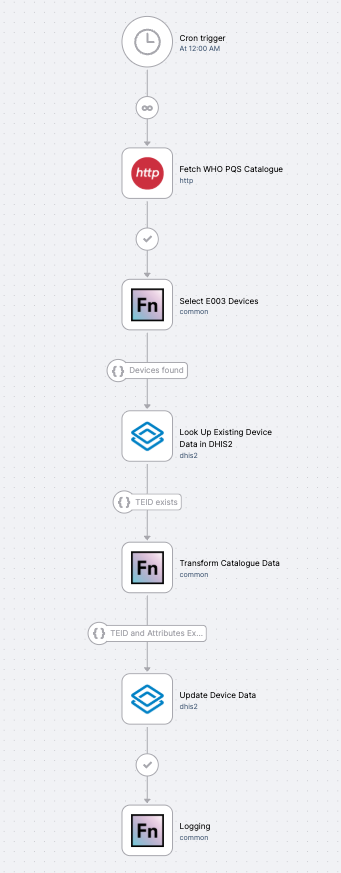
 We’re excited to announce the release of a new OpenFn template: Ingest WHO PQS Cold Chain Catalogue Data to DHIS2! This ready-to-use workflow automates the daily sync of WHO prequalified cold chain equipment specifications into DHIS2 Tracker, keeping your device records current without manual data entry.
 Use Case
Cold chain equipment (CCE) programs often track devices in DHIS2 using WHO PQS (Performance, Quality and Safety) codes — but keeping those records current with the latest WHO catalogue specifications has traditionally meant manual data entry, creating data quality gaps that can affect procurement decisions, lifecycle management, and temperature monitoring.
This template, built in collaboration with the DHIS2 logistics team, automates the daily sync of equipment specifications — such as refrigerator and freezer technical details — directly from the WHO PQS Catalogue into DHIS2 Tracker, so your device records stay accurate without anyone having to maintain them manually.
 Key Features
 Fetches live equipment data directly from the WHO extranet JSON endpoint
 Looks up matching TEIs in DHIS2 by PQS code
 Updates tracked entity attributes with the latest WHO catalogue specifications
 Runs on a daily schedule to stay current as the catalogue evolves
 Scoped to E003 appliance type devices out of the box, and easily extended to other device categories
 Who Should Use It
This template is ideal for immunization programs, cold chain managers, and health system implementers who track CCE in DHIS2 and want device records to automatically reflect the latest WHO-approved specifications. It complements the DHIS2 CCE module and is particularly relevant for lifecycle management and temperature monitoring programs.
The same workflow pattern can be adapted to sync other PQS device categories or additional tracked entity attributes to match your program configuration.
 Under the Hood
@openfn/language-http: Fetches equipment data from the WHO extranet JSON API@openfn/language-dhis2: Queries TEIs by PQS code and updates tracked entity attributes via the Tracker API
Getting Started
You can try this template directly from the OpenFn app — no code setup required. Just follow these steps:
- Log in to your OpenFn account at app.openfn.org (or register here for a free cloud project).
- In your project workspace, click Create Workflow.
- In the new workflow window, search for the template by name:
Ingest WHO PQS Cold Chain Catalogue Data to DHIS2or use any of these tags to find it:dhis2,coldchain,who,pqs,cce,tracker - Once added, enter your DHIS2 credentials.
- That’s it — you’re ready to run the workflow and start syncing data!
Note: The DHIS2 program, organisation unit, and tracked entity attribute IDs in this template are configured against the DHIS2 LMIS sandbox used during development. If you’re using a different DHIS2 instance, you’ll need to update the program ID, OU, and TEA mappings to match your instance configuration.
Happy automating!
— The OpenFn Team